
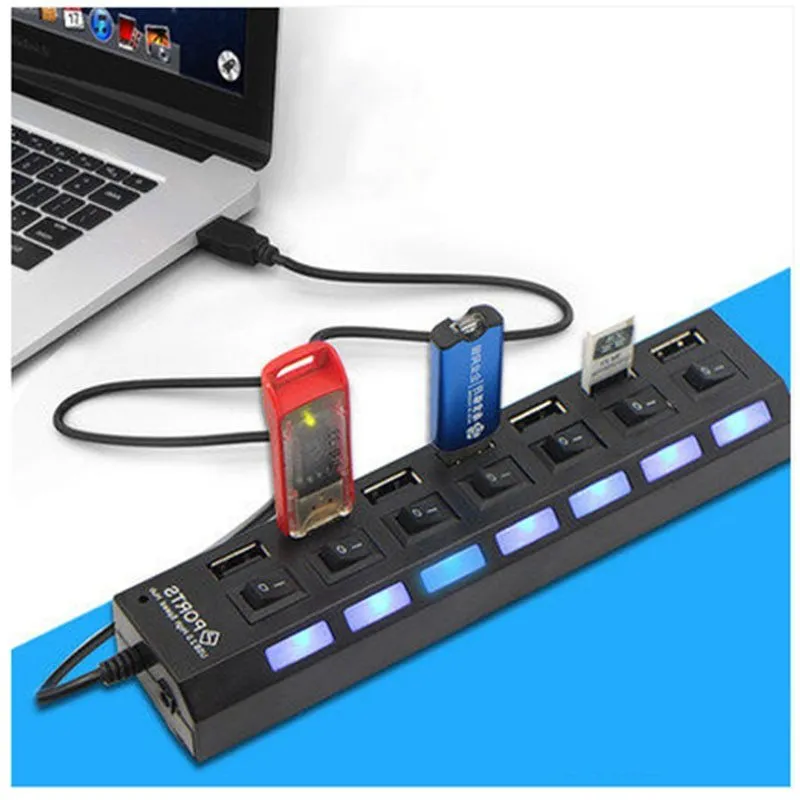
4-port or 7-port USB switch HUB hub for notebook computer laptops connecting mouse keyboards and accessories with plug-and-play design in black or white


4-port or 7-port USB switch HUB hub for notebook computer laptops connecting mouse keyboards and accessories with plug-and-play design in black or white
4-port and 7-port USB switch HUB hub for laptop mouse keyboard and accessory connectivity

Modern laptops often sacrifice multiple USB ports for a slimmer design, leaving users struggling to connect essential wired peripherals like a mouse, keyboard, webcam, or external drive. This USB switch hub provides a straightforward solution, expanding a single laptop USB port into four or seven accessible connections. It operates on a simple plug-and-play principle, requiring no separate power adapter or complicated drivers. Available in both black and white finishes, this hub helps organise your cables and create a more functional workstation, whether you're working from home, in an office, or on the go with your notebook computer.
Features and Construction

The core function of this product is to multiply USB connectivity. The source text specifies two distinct models: a 4-port switch HUB and a 7-port switch HUB. This gives you a choice between a compact hub for a few essential devices or a more expansive option for a fully equipped desk setup. Both models share the same fundamental design and operation.
Material and Build
While the source text does not list the specific materials used in construction, USB hubs of this type are typically housed in a durable plastic casing. The finish is available in either black or white, allowing you to match the hub to your laptop, keyboard, or general desk aesthetic. The build is focused on providing a lightweight and portable form factor that complements a mobile computing lifestyle.
Size and Practical Fit
No exact dimensions are provided in the source material. However, a bus-powered hub (one without an external power supply) like this is generally designed to be compact and portable. It is intended to sit neatly on a desk beside your laptop or can be easily packed into a bag alongside your notebook computer without adding significant bulk or weight, making it a practical travel accessory.
Uses and Placement

This hub is designed for universal connectivity with standard USB-A peripherals. Its primary role is to solve the common problem of insufficient ports on contemporary laptops, transforming a single connection point into a versatile hub for multiple devices.
Event or Professional Use
For professionals or presenters, the hub allows quick setup of a presentation station. You can connect a wireless mouse dongle, a presentation clicker, an external hard drive for your slides, and a keyboard simultaneously. The 7-port model is particularly useful for more complex setups involving additional equipment like a card reader, audio interface, or security dongle for specialised software, all running from your laptop.
Everyday Home Use
At a home office or study desk, this hub creates a permanent docking point for your laptop. Plug in a wired keyboard for comfortable typing, a precise mouse for design work, a webcam for video calls, and a printer cable, keeping all connections organised and readily available. It simplifies the process of connecting and discharging your laptop, reducing wear on the computer's own ports.
Benefits and Buying Value
The value of this USB hub lies in its simplicity and the specific choice it offers. It addresses a clear, common need without unnecessary complexity or cost, providing a reliable way to extend the basic functionality of your notebook computer.
Reuse and Low Maintenance
As a passive, bus-powered device with no moving parts, the hub requires virtually no maintenance. There is no software to update or internal battery to degrade. Its utility extends across multiple laptop upgrades, as the standard USB-A port remains widely supported. This makes it a long-lasting accessory that provides value over several years of use with different computers.
Why Choose This Product
The key decision point offered by this product is the choice between a 4-port or 7-port model. The 4-port version is ideal for users with minimal needs—perhaps just a mouse and keyboard—or for those who prioritise maximum portability. The 7-port model is the better choice for users with a more permanent desk setup who need to connect several peripherals at once, such as designers, programmers, or home office workers with multiple devices. The colour choice (black or white) allows for aesthetic matching to your setup.

